
Maestro Trade logo
Forex Automation • MetaTrader 4

Maestro Trade FX
Forex Automation for MT4

Run tick-based signals and M1/M5 candle strategies through one MetaTrader 4 Expert Advisor. Adjust supported indicator settings, choose your risk currency, and review trade logs from your MT4 setup.

M1 ScalpingM5 TradingTick-Based SignalsForex AutomationCustomizable EA InputsRisk ControlsTrade Logging
MAESTRO TRADE // ILLUSTRATIVE MONITOR
EUR/USDFOREX • M1
BUY SETUP
TrendUP
RiskCONTROLLED
USD/JPYFOREX • M5
SCANNING
ADX19.8
SpreadPASS
GBP/USDFOREX • M5
FILTERED
SignalWAIT
ProtectionON
Automation● ACTIVERisk EngineENABLED
Professional Automation

Built for disciplined execution.

Maestro Trade FX applies its entry, position sizing, and trade management rules automatically when trading is enabled.

01 • SCAN

Forex Monitoring

Monitors the Forex chart you attach it to for qualifying tick-based and candle-based setups.

02 • FILTER

Signal Quality Controls

Uses trend, momentum, volatility, spread, and confirmation filters before a trade can qualify.

03 • EXECUTE

Automated Order Logic

Executes qualifying entries and manages stop-loss and target logic based on the configured strategy.

04 • PROTECT

Risk Management

Controls position size, intended maximum risk, concurrent exposure, and other safety limits.

Customize the EA in MT4

Use the EA’s Inputs tab to adjust supported live indicator settings and risk limits.

Strategy Inputs

One EA combines tick-based signals with strategies that look for setups on closed M1 and M5 candles. Available indicator inputs depend on the strategy.

  • M1 settings include EMA, RSI, ADX, MACD and Donchian lookback.
  • M5 settings include EMA, Bollinger Bands, Stochastic, ADX, MACD and Donchian lookback.
  • Combination strategy settings include EMA, ADX, ATR, Bollinger Bands, Stochastic, CCI, RSI, MACD and Donchian parameters.
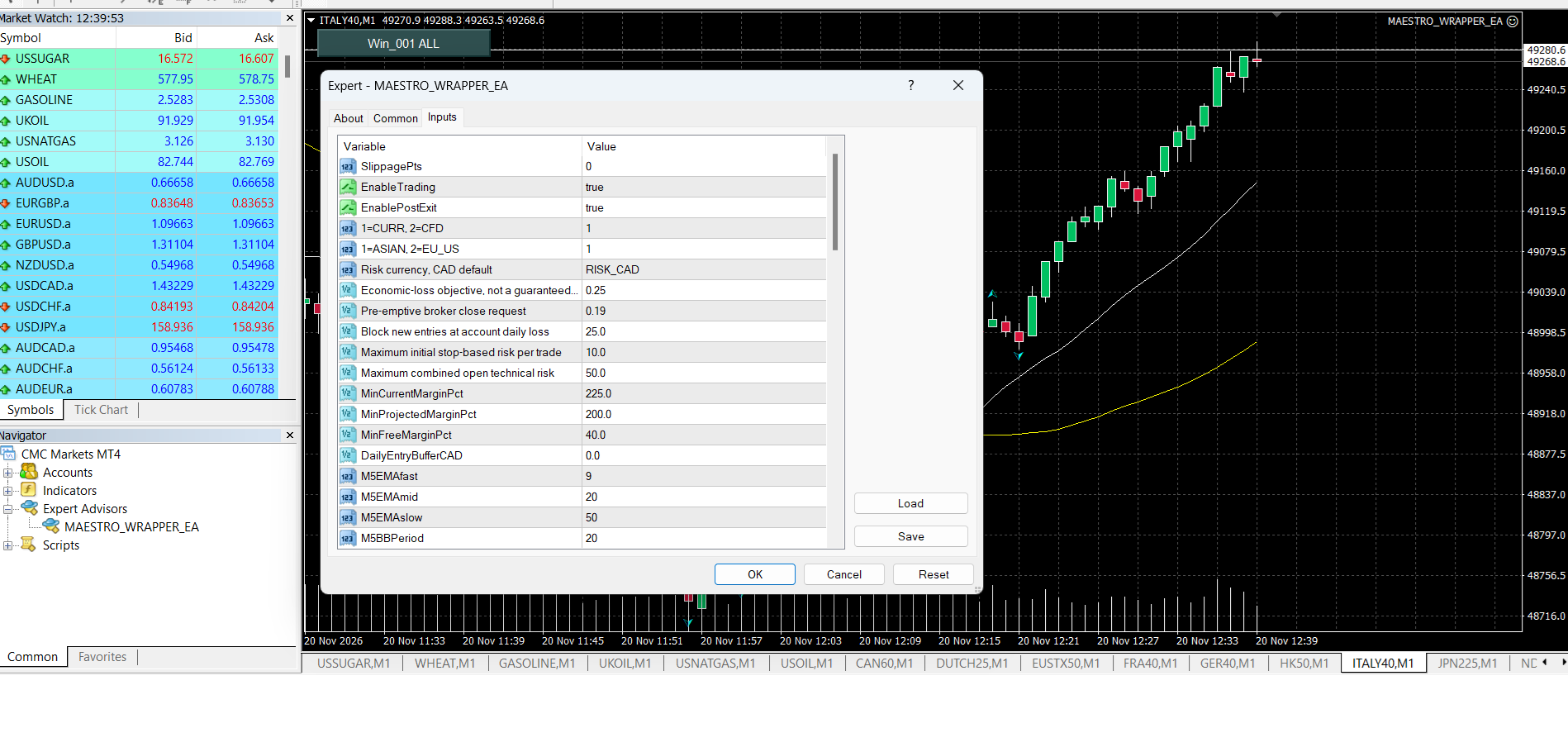
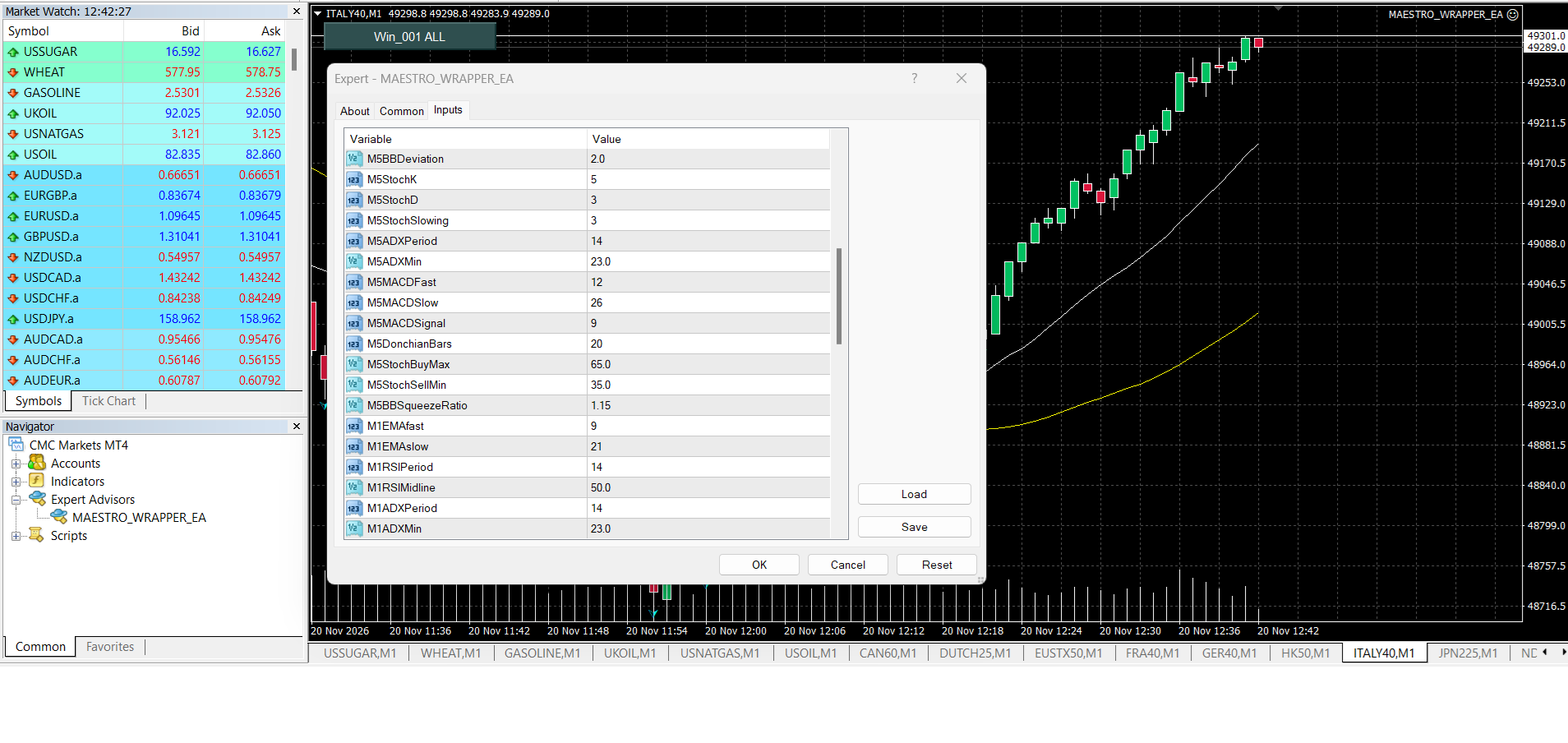
Risk Currency

Choose CAD (default), USD, EUR or GBP. Monetary risk inputs use the selected currency, with broker-provided conversion when your account currency differs.

  • The default 0.25 loss objective means C$0.25 with CAD selected or US$0.25 with USD selected.
  • Configure the early close trigger, daily loss threshold, and initial and combined stop-based risk limits.
  • The EA also checks configurable margin thresholds.

Set up Maestro Trade FX in MT4

Use the desktop MetaTrader 4 terminal with a compatible Forex broker. Start on a demo account.

1

Install the precompiled EA

Download MAESTRO_WRAPPER_EA.ex4. In MT4, go to File > Open Data Folder and copy the EX4 file into MQL4/Experts. No source files or compilation are required.

2

Refresh and attach

In MT4’s Navigator, right-click Expert Advisors and select Refresh. Find MAESTRO_WRAPPER_EA and attach it to an M1 Forex chart.

3

Review the inputs

Keep AssetSelector = 1 for Forex. Review the risk currency, monetary limits, session setting and indicator inputs before enabling automated trading.

4

Test on a demo account

When ready, turn on MT4 AutoTrading and allow live trading in the EA’s settings on the demo account. Check the Experts and Journal tabs, trade logs and account history before using a live account.

MetaTrader 4 setup screenshot MetaTrader 4 EA configuration screenshot
Risk First

Automation without abandoning control.

Maestro Trade is built around configurable safety rules. Risk settings guide position sizing, entry eligibility and close requests. Actual fills and losses depend on broker execution and market conditions.

Risk CapConfigurable intended maximum monetary risk per trade.
Position LimitsLimit initial stop-based risk and combined open risk.
Daily LimitsSet a daily loss threshold that blocks new entries when reached.
Execution FiltersReject setups when spreads, volatility, or signal quality fail requirements.
Forex Offer

Get Maestro Trade FX

Forex

Maestro Trade FX

$149 one-time
Launch pricing

One customizable MT4 Expert Advisor for Forex currency pairs.

  • tick-based signals and M1/M5 candle strategies
  • Configurable indicator inputs and risk limits
  • CAD, USD, EUR or GBP risk currency
  • MT4 installation walkthrough and pair setup guidance
  • Trade logging and strategy telemetry

Purchase & Request Email Delivery

Enter your delivery details, then continue to PayPal. After your $149.00 USD payment is verified, we will personally email your Maestro Trade FX software and installation instructions.

Email delivery after PayPal payment verification. Please use an email address you can access.

Important Risk Disclosure: Trading leveraged Forex involves substantial risk and may result in partial or total loss of capital. Automated systems can generate losing trades, experience slippage, execution failures, outages, or changing market conditions. No profit, return, win rate, or income level is guaranteed. Past, paper, simulated, or historical results do not guarantee future performance. Users are responsible for understanding their broker terms, local regulations, taxation, and the risks of leveraged or speculative trading.

Questions? Send Us a Message

Have a question about Maestro Trade FX, MT4 installation, or Forex broker compatibility? Send us a message and we’ll get back to you.

🔒 Your information is kept private and is used only to respond to your inquiry.